
Billing & Subscriptions
Warning
Subscriptions is an upcoming CityPay capability and should not be treated as a live production API yet. The material on this page is provided as implementation guidance while the service is being prepared.
CityPay Billing will offer options for billing and managing your customers, from straightforward recurring charges to usage-based billing and contracts negotiated on a case-by-case basis. This section is intended to preview the planned capability and help teams prepare for future recurring-payment workflows.
The planned CityPay Billing API is intended to integrate with existing websites, mobile applications, and CRM systems. Developers will be able to create bespoke subscription logic and pricing models tailored to specific needs when the service is available.
Effortlessly design and test pricing plans
- One-time Charge for one-time purchases.
- Recurring billing Charge a single price on a recurring basis.
- Usage-based billing Calculate billing based on product usage.
- Tiered pricing Charge different prices based on volume tiers.
- Promotions and trial periods Adjust billing with discounts and trials.
- Billing frequency Bill daily, weekly, monthly, or annually in advance or in arrears, and set custom future start dates.
A product for a single monthly or annual price.
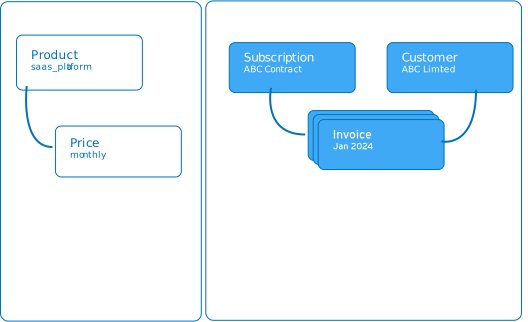
Discover how subscriptions function within our system. Subscriptions involve customers making recurring payments to gain access to a product. This model necessitates maintaining more detailed information about your customers compared to one-time purchases, as it is essential to facilitate future charges.
Understanding the various subscription models is crucial to inform your decisions regarding pricing strategies and payment methods. Consider your business approach:
- If your service requires customers to pay before gaining access, use the "Pay Up Front" option.
- If you plan to capture payment details and offer a free trial period before initiating billing, choose the "Free Trial" option.
- If you intend to provide users access to your service without initially requiring payment information, use the "Freemium" option.
Pay Up Front Model
In the pay-up-front model, payment details are collected and charges are applied before customers gain access to the service. This initial charge is followed by subsequent charges at regular intervals, maintaining a fixed price for the same service level. Management of customer subscriptions is handled through either your control panel (coming soon) or the API.
Consider the example of a digital content streaming service that offers standard and premium viewing packages, charging on a monthly basis:
- One product for the standard option
- One product for the premium option
- One price for the standard option (£39.99 per month)
- One price for the premium option (£79.99 per month)
The typical process flow for this model would be as follows:
- The customer selects their package (standard or premium).
- Payment information is collected from the customer.
- Access to the service is provisioned. This is monitored and controlled through webhook events.
- Continuous access is maintained for the duration of the subscription. Regular checks are conducted to ensure service provision is halted if a payment issue arises.
Free Trial Option
In the free trial model, customers are granted access to the service for a specified duration without initial charges. Upon creating the subscription, an invoice for £0 is automatically generated. Once the trial period concludes, a new billing cycle commences, and a subsequent invoice is issued based on the set price for the chosen product.
Additionally, CityPay provides an option to offer free trials without requiring payment details initially. Subscriptions and invoices are established at the start of the trial and activate at the end of the period if the customer submits a payment method. The trial can either be paused or continued based on customer action at the trial's conclusion.
If there's a need to include a setup fee or another one-time charge when the first post-trial invoice is created, this can be added with the feature to include additional invoice items.
In terms of product and pricing configuration, the setup under a free trial model can mirror that of the fixed-price model. For example, consider a digital media storage service offering standard and premium subscription tiers:
- One product for the standard option
- One product for the premium option
- One price for the standard option (£39.99 per month)
- One price for the premium option (£79.99 per month)
The typical process flow for this model would be as follows:
- The customer selects their preferred plan.
- You provision access to the service.
- Webhooks are employed to monitor events indicating the impending conclusion of the trial and the commencement of billing.
- As the trial expires, a new billing cycle starts, and CityPay generates an invoice, followed by an attempt to process the payment.
Fremium Model
The freemium model shares similarities with the free-trial approach but differs significantly in one key aspect: in the freemium model, access to your service is provided without collecting any payment information from the user.
In a typical freemium setup, a digital media storage company might offer a £10 per month plan for teams and £8 per month plan for individuals. Additionally, customers are provided with a 7-day trial that can be started without the necessity of entering credit card details.
- One product for the team plan
- One product for the individual plan
- One price for the team plan (£10 per month)
- One price for the individual plan (£8 per month)
Here is the typical workflow for this model:
- The customer selects their preferred plan.
- You provision access to the service.
- Webhooks are used to monitor for an event signaling that the trial is nearing its end and billing is set to commence.
- At this point, collect the user’s payment information to ensure the trial transitions into a paid subscription. This can be managed by directing customers to a Checkout session.
- As the trial concludes, a new billing cycle begins for the customer. CityPay generates an invoice immediately after the trial period ends and attempts to process the payment.
Use the following API resources to build and control subscriptions:
| Object | Description |
|---|---|
| Product | What your business provides — this could be either a physical good or a service. |
| Price | Details the cost of products, specifying the amount, currency used, and billing frequency, particularly important for subscription-based pricing. |
| Customer | Allows you to manage recurring charges and track transactions for the same customer by using customer IDs, which are essential for linking to subscription objects when setting up subscriptions. |
| PaymentMethod | The methods by which your customers can pay, such as storing a credit card for regular use. This is often integrated with Payment Intents or Setup Intents APIs to facilitate transactions. |
| Subscription | Encompasses the specific details of the plan a customer has subscribed to, enabling recurring charges as part of the service agreement. |
| Invoice | A detailed record of charges owed by a customer, documenting payment status from initial creation to final payment. Invoices are generated automatically by subscriptions and can also be created manually for one-off billing. |
| PaymentIntent | Facilitates dynamic payment processes by monitoring the payment lifecycle during a customer’s purchase, activating additional authentication or regulatory compliance steps as needed. Payment Intents are generated by invoices as part of the payment process. |
Configure CityPay to dispatch email notifications and reminders to your customers. Some of these emails will include a link to a CityPay hosted page, enabling customers to confirm or update their payment details conveniently.
In your Email settings, you have the option to disable sending emails for successful payments. If you choose to turn off email notifications for successful payments while automatically charging customers, they will not receive an email receipt for these transactions. This can be useful for reducing email clutter for regular and recurring transactions that do not require direct customer follow-up.
You can configure CityPay to send email notifications or reminders to your customers for various transactional events:
- Upon Failed Payment Attempts: Notify customers when a payment attempt is unsuccessful.
- When an Invoice is Finalised: Send alerts once an invoice has been finalised and is ready for payment.
- Receipts After Invoices are Paid: Automatically send receipts after an invoice has been paid.
- When a Payment Requires 3D Secure: Inform customers when additional authentication is needed for a payment and the payment is authorised.
- When a Card on File is About to Expire: Alert customers before their saved payment method expires.
- When a Refund is Issued: Inform customers promptly when a refund has been processed.
- When a Subscription Trial is Ending: Remind customers before the end of a subscription trial period.
- Upon Cancellation of Subscription: Send confirmation when a subscription is cancelled.